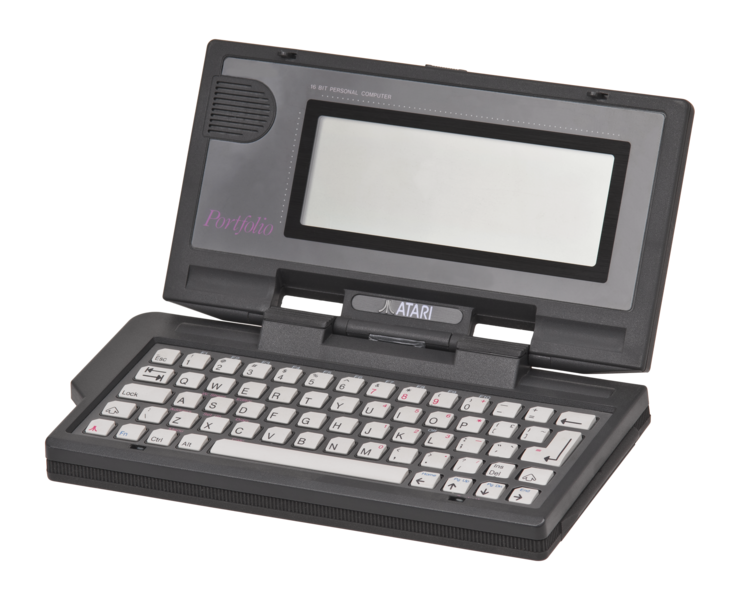
At the end of the 1980s, wearable PCs were not very handy, and Atari's portfolio was a welcome exception: the world's first palmtop computer was small, light and largely DOS-compatible - ideal for business travelers from 1989 and nerds from 2019,
 |
| Photo credits: https://planet-geek.com |
Traveling business people in the 1980s had a lot to carry around with them when they were traveling with a PC: although there were laptops, they were not that handy. Atari's portfolio should solve this problem: The device is considered the first palmtop computer and fits accordingly in the palm of your hand.
Atari at the time of the possibilities, which should offer this small form factor: Businessmen could make calculations on the way to appointments, the appointments themselves were of course in the calendar of the portfolio, as well as the addresses and telephone numbers of the business partners. Despite its tiny dimensions compared to those of the time, the portfolio was not a toy - but with 800 DM it was much cheaper than an IBM computer or an IBM-compatible PC.
The handheld is DOS compatible, it has a nearly 5 MHz fast chip and several programs preinstalled. In conjunction with the built-in full QWERTY keyboard, these should make tasks such as spreadsheets or scheduling possible. We looked at the retro test, what it was like to work with the portfolio and what the palmtop could do with accessories. We were surprised how comparatively easy even today the data transmission is - if you have the right equipment available.
Small black box
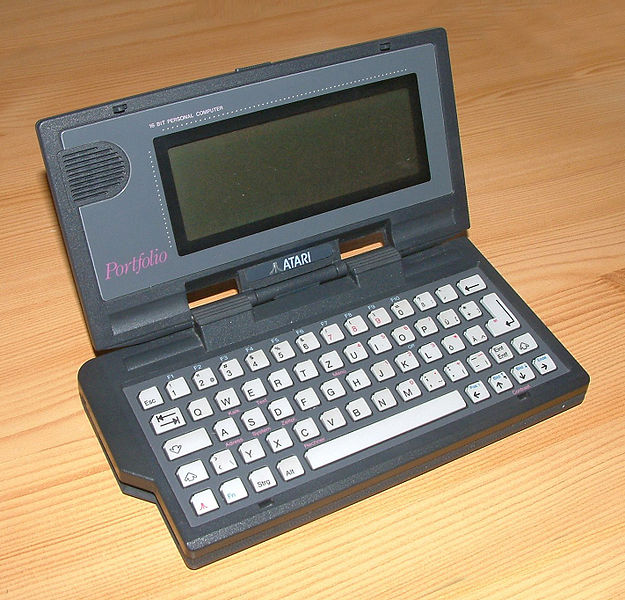
At first glance, the portfolio is reminiscent of a VHS cassette: The device is made of black plastic, which has a slightly rough surface; Fortunately, Atari did not cover the case with a non-slip layer, as IBM did on its Thinkpads. Over the decades, this layer has turned into a sticky mass on most devices, making the handling of the devices uncomfortable.
 |
| Photo credits: https://upload.wikimedia.org/ |
Not so the portfolio: Although our two copies are slightly scratched, overall can still be seen and work, above all, easily. If we open the portfolio, we are greeted by a squeaking noise, which could come from a scary movie. A drop of light gun oil on each side fixes this problem though.
After unfolding, we look at the 4.5-inch monochrome LC screen, which can display 40 characters in eight lines with a resolution of 240 x 64 pixels. Two advanced modes also allow us to use a total of 80 characters in 25 lines; the screen always shows a section of the larger, virtual display. The screen of the portfolio does not have a backlight - a circumstance that Atari tried to conceal in its advertising by taking the screen in bright light. If it gets a little darker, there is not much to see on the portfolio.
The portfolio has a graphics mode with 240 x 64 pixels. Numerous programmers have developed several sometimes noteworthy games for the portfolio - but more on that later.
Keyboard with mini keys
The portfolio has a full-fledged QWERTY keyboard without lighting, the numeric keypad is housed as a second assignment on other keys. Despite its comparatively small size, the portfolio is said to be well-suited for working due to the keyboard - at least that was one of Atari's key messages at the end of the 1980s. We tried that and typed this section on the little computer - after all, word processing is one of the tasks that you need a computer to do in your day-to-day business.
The user experience when typing is extremely modest, which is mainly due to the keyboard of the portfolio: Although this has all the important keys such as umlauts and arrow keys, but is difficult to operate due to the design. On the one hand, the keyboard as a whole and the keys themselves are far too small to comfortably write longer texts; we tap on the portfolio with a maximum of four fingers, there is no room for more. Who controls the ten-finger system, so does not need to start. Besides, the oblique suspension of the small buttons and the resulting unusual pressure point complicates writing. Although the keys provide noticeable resistance, we often catch a key too far down, so it does not fire.
Therefore, writing is not fun at all. The typing error rate is very high for us at normal typing speed; If we do not want to rectify every second word afterward, we must slow our pace accordingly. Of course, Atari had to make a compromise between the size of the device, the size of the keyboard and the technical possibilities of the time - but the portrayed function as office PC replacement can not be accommodated by the portfolio with its keyboard.
DOS-compatible operating system
However, the portfolio offered a lot for its use at the time, especially against the background of the form factor. As the operating system, the computer uses DIP-DOS, which is largely compatible with Microsoft DOS 2.11. This means that users could largely use the same commands they were used to from other PCs. However, the portfolio was not "naked" only with the operating system on the market. The computer has five applications preinstalled: an address book, a calculator, a scheduler, a word processor, and a spreadsheet. In today's world, where there are numerous apps for smartphones to choose from for such applications, this may not impress; in 1989, however, were the ways limited to writing texts on a computer or even executing spreadsheets. This was only possible for those who owned an expensive and bulky laptop.
The built-in calendar seems quite modern: When we open the application, the month and the current day are displayed. Days with appointments are marked by dots, which is why we can quickly and at a glance see when we have a meeting, for example. The appointment entries provide enough space for notes and notes. Each appointment can be provided with an alarm, which reminds us of the due date with a beeping - but this is quite quiet. However, unlike modern calendars, it is not possible to set the reminder to be notified, for example, half an hour in advance. For this, we would have to create an additional appointment.
The address book allows us to store numerous contacts; There is no mask for the individual contact details. How can we freely enter what we think about our respective contacts? Incidentally, the portfolio can play telephone numbers using the touch-tone dialing method: we do not have to enter any telephone numbers, we can choose the portfolio. When the author of this text still had a landline phone, he was able to test this function successfully - with the modern telephone system in the office or a smartphone, it did not work at the time of this test.
Table program with the accustomed operation
With the preinstalled text program, texts can be saved as a TXT file. Formatting is not possible, we can only enter pure text. With the spreadsheet program we can perform common calculations, but the operation is getting used to - especially if you are used to modern spreadsheets with mouse operation. The user still has numerous calculation functions and variables available, the spreadsheet can then be saved as a WCS file on the portfolio. WCS files opened easily in the 1980s and 1990s on Windows Works or Lotus 1-2-3, a very popular program at the time.
Data transmission via a parallel interface
With a bit of effort and the necessary hardware, the portfolio can still be used productively: We can open both our text files and our spreadsheet on a modern Windows 10 computer - but we need a lot of accessories for that. First and foremost, we need the parallel interface for the portfolio; Unfortunately, Atari did not deliver this to the device, users had to buy it separately. This also applies to the matching cable and the power supply of the portfolio - although we prefer using three AA batteries anyway.
Using the parallel interface plugged into the right edge of the portfolio, we can connect the palmtop to a PC via an uncrossed, parallel cable - of course, it must be a computer with DOS support. Here again, our old IBM Thinkpad is used, which we already used in the test of the Timex Data Link. The DOS program FT.com, published by Atari at the time, makes it possible to establish a connection to the portfolio; this must be switched to the connection mode in the system settings.
Data exchange is most convenient from the PC, although FT.com does not provide any comfort features at all. For example, we have to manually enter the file to be transferred, a file browser or even a graphical interface does not exist. You can both send files to the portfolio and receive them from the portfolio. To our astonishment, the data exchange worked directly with us the first time without any problems. Of course, the transmission speed is judged very slowly by today's standards; If you have a file just a few kilobytes in size, we'll have to wait several seconds to transfer it.
Data transmission made easy
Our text file and the spreadsheet are quickly on our Thinkpad, from where we copy it to a floppy disk. We bring their contents to our Windows 10 PC with the help of an external floppy drive - and we can already access the files. Of course, this process serves more to satisfy our craving for retro devices, but it's still interesting to see that it still works today. Incidentally, we still have to convert the worksheet, as there are hardly any programs that can handle the WCS format.
In 1989, of course, that was different: on the flight to business, the meeting could be on the portfolio make a calculation that could be transferred using the adapter and FT.com on a floppy disk at the destination on almost any PC. For the domestic device, there was also a reader for the so-called Bee-Cards, the memory cards used in the portfolio. The built-in memory was rather small with 128 kilobytes - especially since it was also a part of the operating system. The memory cards, which were initially available with 32, 64 or 128 kilobytes, later also up to 4 MB, provided the portfolio with space for the numerous existing software, some of which can still be found on the internet today.
Interestingly, there is still a fairly active scene around the Atari portfolio. Many programs were created well after 1989, in part only in recent years. Numerous websites on the Internet have extensive software libraries and many tips for using the portfolio - such as links to user manuals or diagrams on how the data cable can be soldered together if necessary.
Conclusion
The author of this text knew at least since Terminator 2: Day of Billing that he wanted to have a portfolio. As the rebellious John Connor with his Vokuhila buddy hacked an ATM in record time, he used the Atari calculator. Of course, while the scene in the film was quite unrealistic, that should not hide the fact that the portfolio was and is an extraordinary device.
As the first palmtop computer, the portfolio brought many usage scenarios of a large PC into an incredibly small format for the time. Sure, users had to cut corners, such as the keyboard and the display. But they had a DOS-compatible small computer in front of them, even in the inside pocket of a coat fit. And indeed, some functions of the portfolio can still be used today - certainly in everyday life, the calendar, for example.
However, the portfolio only really gets interesting when it is equipped with additional software that is easy to find on the internet. However, if you want to play additional programs on the small computer, you need additional hardware - for example, the parallel interface and a suitable DOS PC. Some Nerdtum is accordingly a prerequisite if you want to start something more with the portfolio.
Historically, the portfolio was not a long-term success for Atari: the company had not released a successor, but the device disappeared after the merger with JTS in 1996. In 1998, less than ten years after the release of the portfolio, the trademark rights arrived Hasbro.
As much as the portfolio was an outlier in the former PC market, the device was groundbreaking in hindsight: As the first palmtop, the portfolio was the first representative of a long line of small, productive computers, as later as Palm or Compaq handhelds or also devices like the Nokia Communicator existed.
Anyone who wants to buy a portfolio today, for example, will find numerous offers on eBay. A good, functional copy costs - depending on accessories - between 50 and 150 euros. Sometimes the device can also be found at flea markets